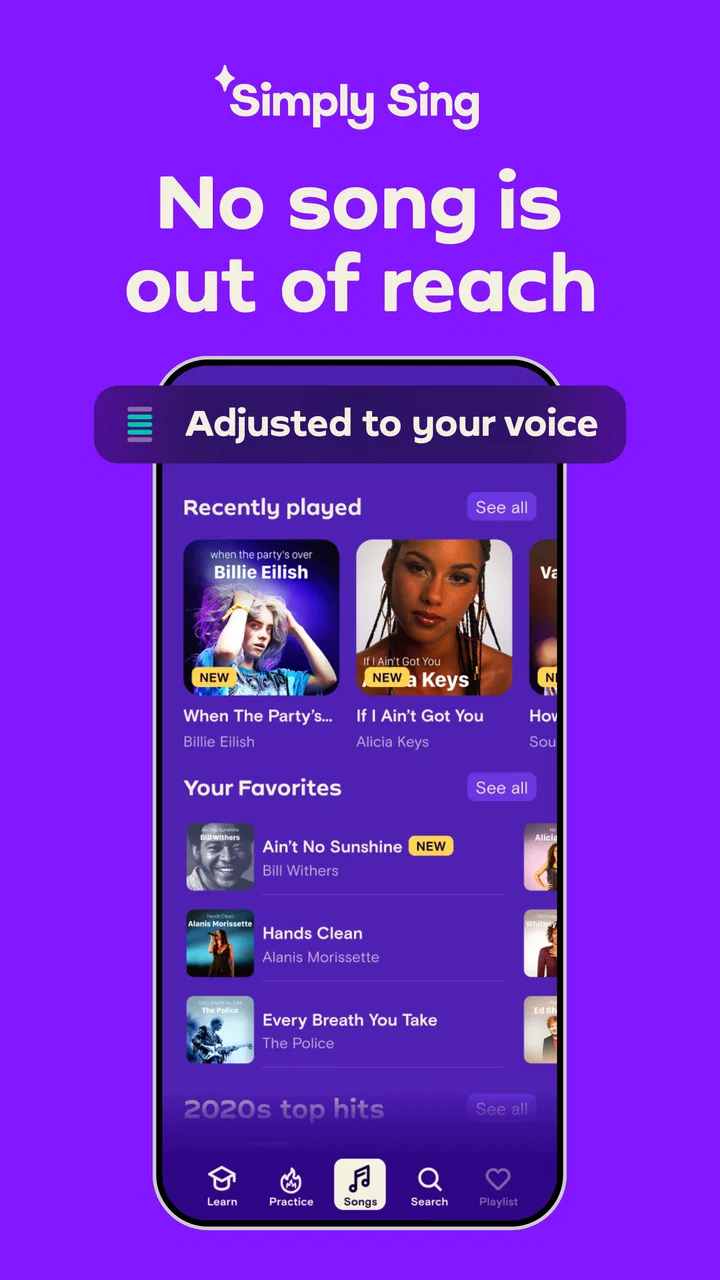
Simply Sing: My Singing App
- 4.4
- Rating
- 10.00M
- Installs
- Free
- Price

 Analysis by App-foxy
When I try a singing app, I want to start making sound quickly, not spend the first few minutes guessing what each screen expects. Simply Sing: My Singing App is aimed at that exact moment: opening a phone, choosing a song, and practicing without needing a full music setup. It is a free music and audio app from Simply Ltd, and its central promise is straightforward: it helps you sing songs that sit higher or lower than your natural voice may comfortably reach.
That makes it more approachable than a traditional vocal-training course, but it also creates an important distinction. This is not the same thing as a professional recording studio, a karaoke system with extensive controls, or a substitute for a voice teacher. I found its appeal strongest when I treated it as a guided singing companion for regular practice rather than as a complete production tool. The experience is friendly, but the first session can still become confusing if audio input, headphones, or song selection are not handled carefully.
Getting past the first-session friction
The most common obstacle is not necessarily the singing itself. It is understanding what the app is listening to and how the phone is playing the accompaniment. If the backing music comes through a speaker while the microphone also hears it, the app may have a harder time separating your voice from the song. I get a cleaner experience by using headphones when possible and keeping my voice close enough to the phone for it to hear naturally, without shouting into the microphone.
You May Also Like

 Blood Strike: 2.5 Anniversary
Blood Strike’s Loadouts Turn Every Drop Into a Tactical Gamble
A close look at Blood Strike’s custom loadouts: how fast access to signature weapons reshapes its battle royale rhythm, rewards preparation, and narrows the gap between fights.

 Pandora - Music & Podcasts
Pandora’s Music Is Easy to Start, but Harder to Recover
Pandora’s strength is its low-effort path from a seed to a station. Its weak spot is how much confidence it asks you to place in connection, setup, and quiet recovery.

 8 Ball Pool
 Is Built on Rivalries, Rematches, and Routine
A close look at the rivalries, rematches, shared routines, and unanswered safety questions that turn a quick pool match into a persistent mobile community.

 Samsung Music
’s Quiet Strength Is Playing What You Already Own
Its reach comes less from spectacle than from dependable access to a personal library. That simplicity is both the app’s strongest retention engine and its ceiling.

 AccuWeather: Weather Radar
AccuWeather Review: A Quick, Clear Forecast for Everyday Decisions
For everyday plans, the best forecast is the one you can understand quickly. AccuWeather makes rain timing, radar, and local conditions easy to act on, with a few trade-offs.

 Hill Climb Racing
Why Hill Climb Racing Still Turns Crashes Into One More Run
A tiny car, a bumpy hill and one more upgrade: Hill Climb Racing keeps resurfacing because its simple chaos makes every near-miss feel personal.
More From Our News Desk



That small change matters because a beginner can easily mistake a weak audio setup for poor singing feedback. If the app seems slow to react, inconsistent, or unable to follow me, I first check the practical things: whether the phone is muted, whether another audio device is connected, and whether I am holding the microphone area in a way that blocks it. These are simple checks, but they prevent a lot of unnecessary frustration.
I also recommend starting with a song that feels comfortable rather than immediately testing the highest or lowest material. The app is designed to make different vocal ranges more accessible, yet that does not mean every song will feel equally natural. A familiar melody lets me concentrate on pitch and breathing instead of trying to remember lyrics, rhythm, and vocal placement at the same time.
One useful habit is to treat the first attempt as a calibration session. I listen to how the accompaniment sits against my voice, notice whether I am singing too softly for the phone, and adjust my distance before judging the result. This is especially helpful in a noisy room. A fan, television, traffic, or another person talking nearby can make any voice app feel less reliable, even when the app itself is working normally.
The app is available for Android devices running at least version 8.0, which covers a wide range of phones, but compatibility alone does not guarantee an equally smooth experience on every handset. Older devices may have less comfortable audio handling, and some phones process microphones or headphones differently. If the app behaves oddly, restarting it and closing other audio-heavy apps is a sensible first step before assuming there is a deeper problem.
A calmer setup produces better practice
I would set up a short, repeatable routine rather than opening the app in the middle of a noisy household. Find a reasonably quiet place, charge the phone, connect headphones if they make the accompaniment easier to hear, and keep the device stable. A stand or table is more useful than holding the phone in one hand while trying to sing, because a steady position keeps the microphone relationship more consistent.
It is also worth checking the phone's general sound level before beginning. If the accompaniment is too loud, I tend to push my voice harder and lose control. If it is too quiet, I may sing cautiously and wonder why the session feels unresponsive. The best balance is one where I can hear the musical guide clearly while still hearing my own voice naturally.
When permission prompts appear during setup, I read them rather than dismissing them automatically. A singing app needs a way to hear the user for its central interaction to make sense. If that access was denied earlier, revisiting the phone's app settings and allowing the relevant audio access can resolve a silent or unresponsive session. This is a general device check, not a special trick, but it is one of the first things I would inspect.
Another practical point is network stability. I avoid beginning a new session in a place where the connection is constantly dropping, particularly if the app needs to load song material or account-related content. If something remains stuck, I switch between a reliable Wi-Fi connection and mobile data when available, then reopen the app. I do not repeatedly tap the same button while the phone is still trying to respond; that usually makes it harder to tell whether the problem is loading, audio, or navigation.
The current version is 2.11.9, so keeping the installation current is sensible when a problem appears after a long period without updating. I would also restart the phone if audio is failing across several apps, because that points more toward the device's sound system than toward Simply Sing itself. The key is to isolate the problem instead of changing several settings at once.
Recovering a session without losing momentum
If a song stops responding, my first recovery step is to leave the session and return to it once. If that does not help, I fully close the app and reopen it. I avoid immediately uninstalling anything because that can create extra setup work and may not address the real cause. A frozen screen, missing sound, and inaccurate vocal response each suggest a different kind of issue, so I handle them separately.
For missing accompaniment, I check the phone volume, headphone connection, and whether audio is being routed to another device. For a microphone that seems inactive, I check the app's permission and make sure no physical case or hand is covering the microphone opening. For a session that loads slowly, I check the connection and give it a moment before trying again. These steps sound obvious, but they are much faster than repeatedly changing vocal technique in response to a technical fault.
When I return after an interruption, I do not assume I need to restart the entire practice plan. I simply repeat the last comfortable section and compare the response. That gives me a useful reference: if the same setup now works, the earlier issue was likely temporary; if the problem remains, I can focus on device or connection troubleshooting. This recovery method keeps a small technical interruption from turning into a lost practice day.
There is also a human side to recovery. If I have been singing loudly to make the app hear me, I pause and reset my posture and breathing before continuing. Pushing volume is not a reliable solution to microphone problems, and it can make the session tiring. A relaxed, clear voice at a sensible distance is a better test of whether the app is responding properly.
For people sharing a home, headphones are particularly useful in an everyday scenario. Imagine wanting ten minutes of practice before work while someone else is still asleep. Playing the accompaniment through the phone speaker is inconvenient, and lowering it too far can make the exercise difficult. Headphones let me hear the musical guide privately, while a quiet room and a stable phone position make it easier for the app to hear my voice. That combination is more practical than trying to sing over a loud speaker.
Separating app problems from singing problems
Not every disappointing result means the app has judged me incorrectly. Singing while looking down at a phone, standing tensely, or trying to match a song that sits outside my comfortable range can produce a strained performance. I get more useful practice when I stand or sit upright, keep my jaw relaxed, and begin at a moderate volume. The app can support the exercise, but it cannot replace the physical habits that make singing easier.
Room acoustics can also change what I hear. A bathroom may make my voice seem fuller because of the reflections, while a carpeted bedroom may sound much drier. Neither environment necessarily represents how well I am matching the song. I prefer a normal room with limited background noise, because it gives me a more honest sense of my voice and reduces the temptation to chase an artificial echo.
Headphones bring their own trade-off. They improve privacy and help separate the backing track from outside noise, but they can also make my own voice feel unfamiliar. If I sing too loudly while wearing them, I may be reacting to the altered sound rather than to the actual musical line. I keep the accompaniment at a comfortable level and take occasional breaks to check how my voice feels without forcing it.
The advertised range flexibility is valuable, especially for people who enjoy songs written for voices unlike their own. Still, flexibility should not be confused with effortless transposition of every musical challenge. A song can be technically reachable and still be tiring because of its phrasing, speed, or sustained notes. I judge a song by how my whole voice feels afterward, not only by whether I managed one difficult passage.
This is where the app differs from ordinary karaoke. Karaoke is often centered on entertainment, lyrics, and performing along with a track. Simply Sing feels more useful when I want to work on my own singing and make a difficult song less intimidating. On the other hand, someone who wants detailed recording controls, mixing, live effects, or a large social performance environment may be better served by a dedicated karaoke or recording app. I would not choose this one expecting a full studio workflow.
Who will get the most from it?
I think the strongest audience is beginners, casual singers, and people who want a low-pressure way to practice at home. The app suits someone who may feel embarrassed about joining a formal lesson but still wants a structured reason to sing regularly. It can also help a more experienced hobby singer explore songs outside a familiar range, provided they remain attentive to vocal comfort rather than chasing a perfect result.
It is less suitable for a singer who needs detailed technical instruction about breath support, resonance, diction, or injury prevention. A voice teacher can observe posture and physical tension in a way a phone cannot. Likewise, musicians who want to edit takes, arrange harmonies, or export polished recordings should look toward tools built specifically for production. The app's value is in accessible practice, not in replacing every other music tool.
The age rating is Everyone, which matches the broad, approachable nature of the product. It is free to download, but in-app purchases range from $6.99 to $89.99 per item. That pricing detail is important before committing to a long-term routine. I would begin with the free experience, understand what is available, and decide whether the paid content fits my actual use rather than assuming that every song or exercise is included at no cost.
That is also why I would not judge the app solely by its average rating of 4.3 from around 271 thousand ratings. That is a strong sign that many people find it useful, and the app has passed five million installs, but popularity does not guarantee that its approach will suit every singer. Someone looking for social karaoke, studio recording, or one-to-one coaching may still prefer another category of app despite those numbers.
My practical verdict after using it
Simply Sing: My Singing App works best when I use it as a convenient practice tool with a sensible setup. Its biggest strength is making range feel less like a fixed barrier. Instead of abandoning a song because it seems too high or too low, I can approach it with a more flexible mindset and concentrate on singing rather than comparing my voice with the original performer.
The main friction is that the experience depends heavily on the phone environment. Microphone placement, headphone routing, room noise, permissions, connection quality, and the user's own volume can all affect the session. None of those issues makes the app unusable, but they mean I need to spend a little time preparing. Once I do, the practice feels more consistent and much less mysterious.
Simply Ltd has made an app that is easy to recommend to a friend who wants to sing more often but does not know where to begin. I would tell that friend to start quietly, use a familiar song, test the audio before judging the feedback, and stop if the voice feels strained. I would also be clear about the purchase range and about the app's limits: it is not a replacement for a teacher, a recording workstation, or every form of karaoke entertainment.
For casual home practice, especially when I want to explore songs outside my natural range, it earns a place on my phone. For advanced vocal diagnosis or serious music production, I would pair it with a specialist tool instead. That balanced role is exactly where it feels most convincing: a friendly starting point for consistent singing practice, provided the setup is treated as part of the experience.
FAQs for Simply Sing: My Singing App
01What is Simply Sing: My Singing App?
Simply Sing: My Singing App is an interactive singing application designed to help users improve their vocal skills. It provides a range of features, including guided exercises, song libraries, and real-time feedback. Whether you’re a beginner or an experienced singer, this app offers tools and resources to enhance your singing abilities.
02How does Simply Sing provide real-time feedback?
Simply Sing uses advanced audio analysis to evaluate your singing. The app listens to your pitch, tone, and rhythm, providing instant feedback on areas of improvement. This feature helps users identify their strengths and work on weaknesses, making it a valuable tool for vocal training.
03Can I use Simply Sing offline?
Simply Sing requires an internet connection for downloading songs and accessing some features. However, once you've downloaded your preferred songs and exercises, you may be able to use certain functionalities offline. For the best experience, it’s recommended to remain connected to the internet.
04Is Simply Sing suitable for all age groups?
Yes, Simply Sing is designed for users of all ages. Its intuitive interface and diverse song library make it accessible for children, teenagers, and adults. The app provides age-appropriate content and exercises, ensuring a safe and enjoyable experience for everyone interested in singing.
05Are there in-app purchases in Simply Sing?
Simply Sing offers a variety of free features, but it also includes optional in-app purchases. These purchases can unlock additional songs, exercises, and premium functionalities. Users can choose to enhance their experience by purchasing these extras, though the app remains functional without them.
Pros
- Intuitive interface for easy navigation.
- Wide selection of popular songs.
- Real-time feedback on singing accuracy.
- Offline mode available for practice.
- Customizable difficulty levels.
Cons
- Limited free content options.
- Occasional app crashes reported.
- Subscription required for full access.
- Microphone access needed for use.
- In-app ads can be distracting.

Simply Sing: My Singing App
Gallery